

Skip to content
-
Explore tech, ideas, and the journey of building — welcome to Torin Digital Garden.
Torin Digital Garden Torin Digital Garden Torin Digital Garden

Tech, Coding & Build in Public

Torin Digital Garden Torin Digital Garden Torin Digital Garden

Tech, Coding & Build in Public

  • Home
  • The Lab
    • Code Snippets
    • Digital Assets
    • Downloads
  • Stories
    • Tech Journal
    • Human Connect
    • Inspirations
  • Showcase
    • Mobile Apps
    • Web Projects
  • About
  • Contact
  • Home
  • The Lab
    • Code Snippets
    • Digital Assets
    • Downloads
  • Stories
    • Tech Journal
    • Human Connect
    • Inspirations
  • Showcase
    • Mobile Apps
    • Web Projects
  • About
  • Contact
Close

Search

Trending Now:
5 Essential Tools Every Blogger Should Use Music Trends That Will Dominate This Year ChatGPT prompts – AI content & image creation trend Ghibli trend – viral anime-style visual trend
  • https://www.facebook.com/
  • https://twitter.com/
  • https://t.me/
  • https://www.instagram.com/
  • https://youtube.com/
Torin Digital Garden Torin Digital Garden Torin Digital Garden

Tech, Coding & Build in Public

Torin Digital Garden Torin Digital Garden Torin Digital Garden

Tech, Coding & Build in Public

  • Home
  • The Lab
    • Code Snippets
    • Digital Assets
    • Downloads
  • Stories
    • Tech Journal
    • Human Connect
    • Inspirations
  • Showcase
    • Mobile Apps
    • Web Projects
  • About
  • Contact
  • Home
  • The Lab
    • Code Snippets
    • Digital Assets
    • Downloads
  • Stories
    • Tech Journal
    • Human Connect
    • Inspirations
  • Showcase
    • Mobile Apps
    • Web Projects
  • About
  • Contact
Close

Search

Trending Now:
5 Essential Tools Every Blogger Should Use Music Trends That Will Dominate This Year ChatGPT prompts – AI content & image creation trend Ghibli trend – viral anime-style visual trend
  • https://www.facebook.com/
  • https://twitter.com/
  • https://t.me/
  • https://www.instagram.com/
  • https://youtube.com/
Home/Stories/Tech Journal/How to Fix “A Supported DirectX 8.0 Compatible Graphics Card Was Not Found” in Army Men: RTS
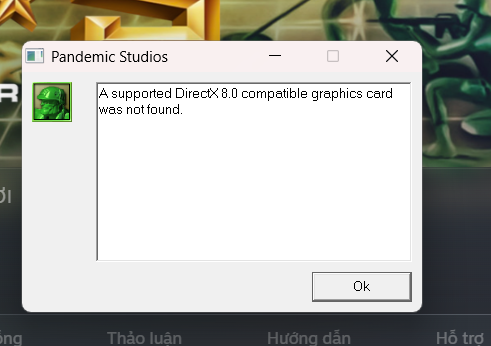
Example of DirectX 8 error in Army Men RTS
Tech JournalStories

How to Fix “A Supported DirectX 8.0 Compatible Graphics Card Was Not Found” in Army Men: RTS

By Torin Tran
April 1, 2026 2 Min Read
2
Updated April 1, 2026
Contents hide
How to Fix “A Supported DirectX 8.0 Compatible Graphics Card Was Not Found” in Army Men: RTS
Why This Error Happens
Quick Fix (Recommended)
Additional Fixes
Advanced Fix (Recommended)
Community Tip
Conclusion
FAQ

How to Fix “A Supported DirectX 8.0 Compatible Graphics Card Was Not Found” in Army Men: RTS

Example of DirectX 8 error in Army Men RTS

If you’re trying to run Army Men: RTS and encounter the error:

“A supported DirectX 8.0 compatible graphics card was not found” or atiumdag.dll error

Don’t worry — this is a common issue when running old games on modern PCs. In this guide, you’ll learn the fastest and most effective fix.

Why This Error Happens

  • The game uses DirectX 8.0 (outdated)
  • Modern GPUs don’t fully support it
  • Conflict with dbghelp.dll
DirectX 8 compatibility issue on modern systems

Quick Fix (Recommended)

Step 1: Open Game Folder

  • Open Steam Library
  • Right-click Army Men RTS
  • Select Properties
  • Go to Local Files
  • Click Browse Local Files
Open game installation folder via Steam

Step 2: Navigate to Folder

\library\dbg\

Step 3: Rename File

Find this file:

dbghelp.dll

Rename it to:

dbghelp_old.dll
Rename the file to fix the error

Done! Launch the game again.

Additional Fixes

1. Install DirectX 8.0a

Older games require legacy DirectX versions. Install DirectX 8.0a to ensure compatibility.

2. Reinstall GPU Drivers (Clean)

Use tools like DDU to remove old drivers completely, then reinstall the latest version.

3. Run in Compatibility Mode

  • Right-click amrts.exe
  • Select Properties → Compatibility
  • Choose Windows XP or Windows 7

Advanced Fix (Recommended)

Use dgVoodoo2 to emulate DirectX and improve compatibility and graphics.

  • Download dgVoodoo2
  • Copy dgVoodooCpl.exe and files from MS\x86 into game folder
  • Run dgVoodooCpl
  • Set resolution in DirectX tab
  • Apply and launch game

Community Tip

Try renaming:

Olddbghelp.dll

If the default rename doesn’t work.

Conclusion

  • Rename dbghelp.dll → dbghelp_old.dll
  • Install DirectX 8 if needed
  • Use dgVoodoo2 for best results

FAQ

Why does this happen? Old DirectX is not supported on modern systems.

Is this fix safe? Yes, widely used and safe.

Do I need dgVoodoo2? No, but it improves performance.

Author

Torin Tran

Follow Me
Other Articles
Giao diện quản trị VPS Vietnix lần đầu dùng của Torin
Previous

48 Hours of “Culture Shock”: My First Time Using VPS – From Noob to Digital Garden Owner

2 Comments
  1. KhangLB says:
    April 1, 2026 at 8:32 am

    Ngon

    Reply
  2. PhuongPT says:
    April 1, 2026 at 9:05 am

    ok

    Reply

Leave a Reply Cancel reply

Your email address will not be published. Required fields are marked *

Recent Posts

  • How to Fix “A Supported DirectX 8.0 Compatible Graphics Card Was Not Found” in Army Men: RTS
  • 48 Hours of “Culture Shock”: My First Time Using VPS – From Noob to Digital Garden Owner

Recent Comments

  1. PhuongPT on How to Fix “A Supported DirectX 8.0 Compatible Graphics Card Was Not Found” in Army Men: RTS
  2. KhangLB on How to Fix “A Supported DirectX 8.0 Compatible Graphics Card Was Not Found” in Army Men: RTS

Categories

  • Stories
  • Tech Journal
Hey, I’m Torin — I build, learn, and share thoughts on tech, business, and life.
  • X
  • Instagram
  • Facebook
  • YouTube
Work Experience

MOBILE-ID

Backend Developer

2022-present

Bee Tech

Backend Developer

2022-2022

Open to collaborations
Get In Touch

Recent Posts

  • Example of DirectX 8 error in Army Men RTS
    How to Fix “A Supported DirectX 8.0 Compatible Graphics Card Was Not Found” in Army Men: RTS
    by Torin Tran
    April 1, 2026
  • Giao diện quản trị VPS Vietnix lần đầu dùng của Torin
    48 Hours of “Culture Shock”: My First Time Using VPS – From Noob to Digital Garden Owner
    by Torin Tran
    March 31, 2026
  • Example of DirectX 8 error in Army Men RTS
    How to Fix “A Supported DirectX 8.0 Compatible Graphics Card Was Not Found” in Army Men: RTS
    by Torin Tran
    April 1, 2026

Search...

A personal space dedicated to technology exploration, creative problem-solving, and sharing digital insights. Join me on the journey of continuous learning.

Latest Posts

  • How to Fix “A Supported DirectX 8.0 Compatible Graphics Card Was Not Found” in Army Men: RTS
    How to Fix “A Supported DirectX 8.0 Compatible Graphics Card… Read more: How to Fix “A Supported DirectX 8.0 Compatible Graphics Card Was Not Found” in Army Men: RTS
  • 48 Hours of “Culture Shock”: My First Time Using VPS – From Noob to Digital Garden Owner
    Introduction: Why did I choose to “torture” myself with a… Read more: 48 Hours of “Culture Shock”: My First Time Using VPS – From Noob to Digital Garden Owner

Pages

  • About
  • Contact
  • Privacy Policy

Contact

Phone

(+84) 348 026 021

Email

torintran.dev@gmail.com

Location

Ho Chi Minh City, Vietnam

Copyright 2026 — Torin Digital Garden. All rights reserved.