

Skip to content
-
Explore tech, ideas, and the journey of building — welcome to Torin Digital Garden.
Torin Digital Garden Torin Digital Garden Torin Digital Garden

Tech, Coding & Build in Public

Torin Digital Garden Torin Digital Garden Torin Digital Garden

Tech, Coding & Build in Public

  • Home
  • The Lab
    • Code Snippets
    • Digital Assets
    • Downloads
  • Stories
    • Tech Journal
    • Human Connect
    • Inspirations
  • Showcase
    • Mobile Apps
    • Web Projects
  • About
  • Contact
  • Home
  • The Lab
    • Code Snippets
    • Digital Assets
    • Downloads
  • Stories
    • Tech Journal
    • Human Connect
    • Inspirations
  • Showcase
    • Mobile Apps
    • Web Projects
  • About
  • Contact
Close

Search

Trending Now:
5 Essential Tools Every Blogger Should Use Music Trends That Will Dominate This Year ChatGPT prompts – AI content & image creation trend Ghibli trend – viral anime-style visual trend
  • Github
  • X
  • Instagram
  • Facebook
  • Reddit
  • Telegram
Torin Digital Garden Torin Digital Garden Torin Digital Garden

Tech, Coding & Build in Public

Torin Digital Garden Torin Digital Garden Torin Digital Garden

Tech, Coding & Build in Public

  • Home
  • The Lab
    • Code Snippets
    • Digital Assets
    • Downloads
  • Stories
    • Tech Journal
    • Human Connect
    • Inspirations
  • Showcase
    • Mobile Apps
    • Web Projects
  • About
  • Contact
  • Home
  • The Lab
    • Code Snippets
    • Digital Assets
    • Downloads
  • Stories
    • Tech Journal
    • Human Connect
    • Inspirations
  • Showcase
    • Mobile Apps
    • Web Projects
  • About
  • Contact
Close

Search

Trending Now:
5 Essential Tools Every Blogger Should Use Music Trends That Will Dominate This Year ChatGPT prompts – AI content & image creation trend Ghibli trend – viral anime-style visual trend
  • Github
  • X
  • Instagram
  • Facebook
  • Reddit
  • Telegram
Home/Stories/Upgraded to a 2K Monitor: YouTube Lags in Windowed Mode but Runs Smooth in Full Screen? Here’s the Fix!
StoriesTech Journal

Upgraded to a 2K Monitor: YouTube Lags in Windowed Mode but Runs Smooth in Full Screen? Here’s the Fix!

By Torin Tran
May 21, 2026 3 Min Read
0
Updated May 21, 2026

So, you just upgraded your setup from a standard Full HD (1080p) monitor to a crisp, beautiful 2K (1440p) display. First impression? Absolutely glorious. Way more screen real estate for coding, and everything looks incredibly sharp.

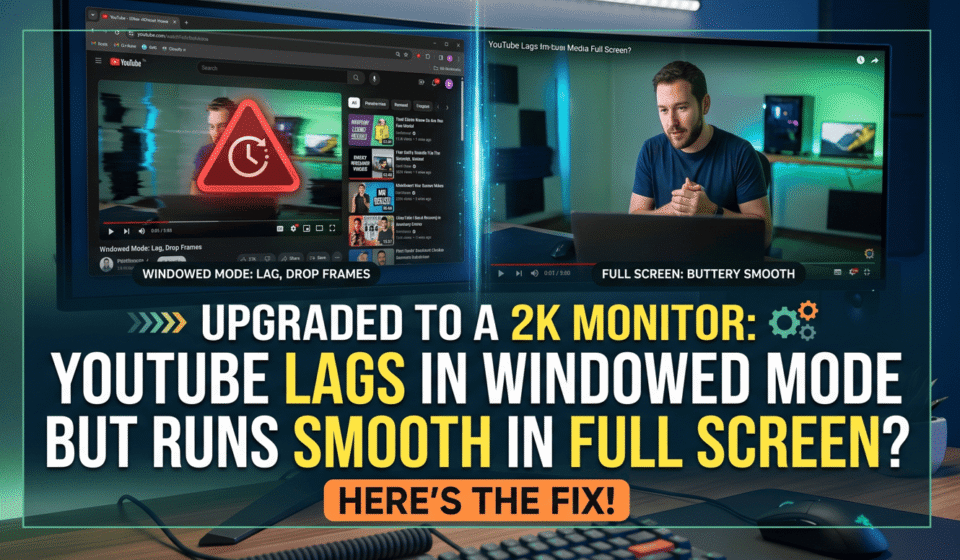
But then, reality hits. You open up YouTube, wanting to put a video or some lo-fi music in the corner of your screen while you work. And boom—this incredibly annoying bug shows up: Whenever the video is in Default view or Theater mode, it stutters, lags, and drops frames like a PowerPoint slideshow. But the moment you hit Full Screen? It runs buttery smooth.

Wait, isn’t Full Screen supposed to be heavier on your system? After a bit of frustrating troubleshooting, I finally figured out why this weird bug happens and how to crush it. If you’re stuck in the same boat, here is the quick fix so you don’t waste your time digging through random forums.

Why on Earth Does This Happen?
Step-by-Step Fixes (Method 1 Fixed It Instantly For Me)
Method 1: Toggle “Hardware Acceleration” On/Off
Method 2: Change the Graphics Backend (ANGLE flag)
Wrap Up

Why on Earth Does This Happen?

After inspecting a few things, I realized the culprit isn’t your new monitor, nor is it a weak GPU. It’s simply your browser (Chrome, Edge, Brave, etc.) losing its mind while rendering at a higher resolution.

  • In Full Screen: Windows and your GPU focus 100% of their power on processing just that single video stream. That’s why it’s smooth.
  • In Windowed Mode: Your browser has to decode that 2K/4K video, push all those extra pixels on your new 2K monitor, and constantly render everything else around it—like the recommended videos sidebar, the scrolling comment section, and loading animations. This overwhelms the browser’s rendering engine or triggers a hardware conflict, causing it to lag out.

Step-by-Step Fixes (Method 1 Fixed It Instantly For Me)

Give these methods a shot one by one. One of them will definitely do the trick.

Method 1: Toggle “Hardware Acceleration” On/Off

90% of the time, this issue is just your browser and your graphics card driver having a communication breakdown.

  1. Open your browser Settings (Chrome/Edge).
  2. Type hardware into the settings search bar to save time.
  3. Look for Use graphics acceleration when available.
    • If it’s currently ON: Turn it OFF.
    • If it’s currently OFF: Turn it ON.
  4. Click Relaunch to restart your browser.
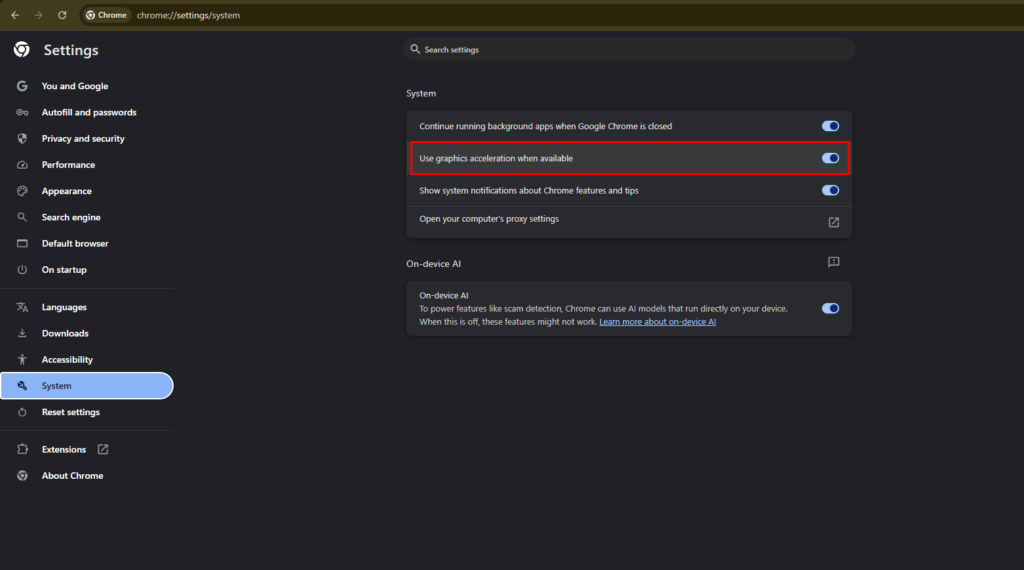
(For my setup, turning it ON and making sure my GPU drivers were fully updated fixed the issue completely).

Method 2: Change the Graphics Backend (ANGLE flag)

If Method 1 didn’t do jack, let’s dig a bit deeper into the browser’s internal engine.

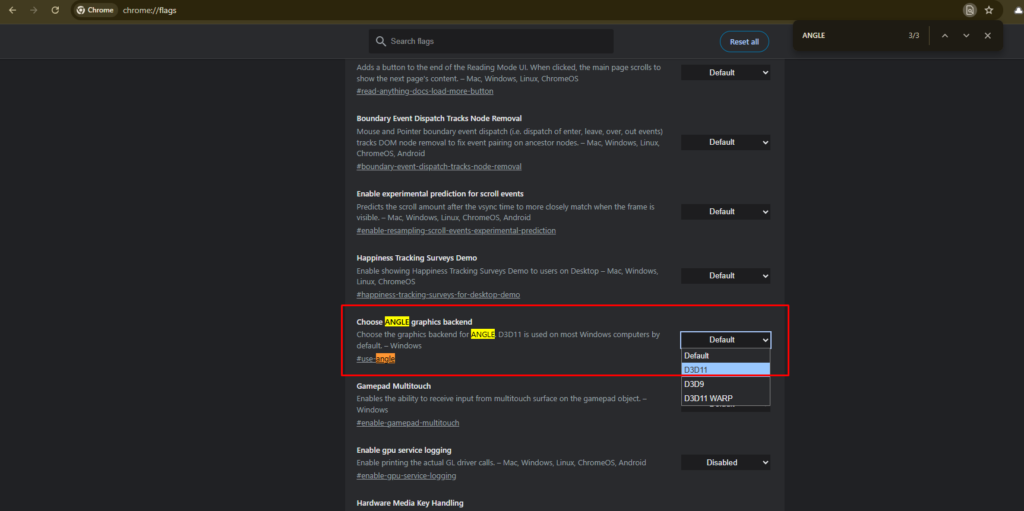
  1. In your address bar, type: chrome://flags (or edge://flags if you use Edge).
  2. Search for ANGLE.
  3. Look for a setting named Choose ANGLE graphics backend. By default, it will be set to Default.
  4. Click the dropdown and switch it to D3D11 or OpenGL. Usually, selecting D3D11 on Windows stops the video stuttering while scrolling.
  5. Relaunch the browser and check the video again.
Wrap Up

Upgrading your monitor is supposed to be an upgrade to your happiness, so getting hit with these random software bugs can really ruin the vibe. Hopefully, this guide helped you fix the lag in a heartbeat.

Which method worked for you? Let me know in the comments below, or drop a line if you found an even better way to fix it!


Author

Torin Tran

Follow Me
Other Articles
Previous

How to Safely Update ASUS Prime B660M-K D4 BIOS (From 2212 to 3811)

No Comment! Be the first one.

Leave a Reply Cancel reply

Your email address will not be published. Required fields are marked *

Recent Posts

  • Upgraded to a 2K Monitor: YouTube Lags in Windowed Mode but Runs Smooth in Full Screen? Here’s the Fix!
  • How to Safely Update ASUS Prime B660M-K D4 BIOS (From 2212 to 3811)
  • How to fix slow internet — the night 300Mbps betrayed me
  • My “Mission Impossible”: Using Redirection Regex to Rescue torintran.com
  • Keggo – A simple, private Kegel training app you’ll actually use

Recent Comments

  1. Anna on Why My Website Couldn’t Get Google AdSense Approved (And How I Finally Fixed It)
  2. PhuongPT on How to Fix “A Supported DirectX 8.0 Compatible Graphics Card Was Not Found” in Army Men: RTS
  3. KhangLB on How to Fix “A Supported DirectX 8.0 Compatible Graphics Card Was Not Found” in Army Men: RTS

Categories

  • Keggo
  • Mobile Apps
  • Showcase
  • Stories
  • Tech Journal
Hey, I’m Torin — I build, learn, and share thoughts on tech, business, and life.
  • X
  • Instagram
  • Facebook
  • YouTube
  • GitHub
Work Experience

MOBILE-ID

Backend Developer

2022-present

Bee Tech

Backend Developer

2022-2022

Open to collaborations
Get In Touch

Recent Posts

  • Upgraded to a 2K Monitor: YouTube Lags in Windowed Mode but Runs Smooth in Full Screen? Here’s the Fix!
    by Torin Tran
    May 21, 2026
  • Giao diện quản trị VPS Vietnix lần đầu dùng của Torin
    48 Hours of “Culture Shock”: My First Time Using VPS – From Noob to Digital Garden Owner
    by Torin Tran
    March 31, 2026
  • Example of DirectX 8 error in Army Men RTS
    How to Fix “A Supported DirectX 8.0 Compatible Graphics Card Was Not Found” in Army Men: RTS
    by Torin Tran
    April 1, 2026
  • Why My Website Couldn’t Get Google AdSense Approved (And How I Finally Fixed It)
    by Torin Tran
    April 3, 2026

Search...

A personal space dedicated to technology exploration, creative problem-solving, and sharing digital insights. Join me on the journey of continuous learning.

Latest Posts

  • Why My Website Couldn’t Get Google AdSense Approved (And How I Finally Fixed It)
    Getting approved by Google AdSense sounds simple on paper. But… Read more: Why My Website Couldn’t Get Google AdSense Approved (And How I Finally Fixed It)
  • Upgraded to a 2K Monitor: YouTube Lags in Windowed Mode but Runs Smooth in Full Screen? Here’s the Fix!
    So, you just upgraded your setup from a standard Full… Read more: Upgraded to a 2K Monitor: YouTube Lags in Windowed Mode but Runs Smooth in Full Screen? Here’s the Fix!
  • My “Mission Impossible”: Using Redirection Regex to Rescue torintran.com
    Redirection Regex is basically the “Undo” button every developer needs… Read more: My “Mission Impossible”: Using Redirection Regex to Rescue torintran.com

Pages

  • About
  • Contact
  • Privacy Policy

Contact

Phone

(+84) 348 026 021

Email

contact@torintran.com

Location

Ho Chi Minh City, Vietnam

Copyright 2026 — Torin Digital Garden. All rights reserved.