

How to Fix “A Supported DirectX 8.0 Compatible Graphics Card Was Not Found” in Army Men: RTS

Updated April 1, 2026

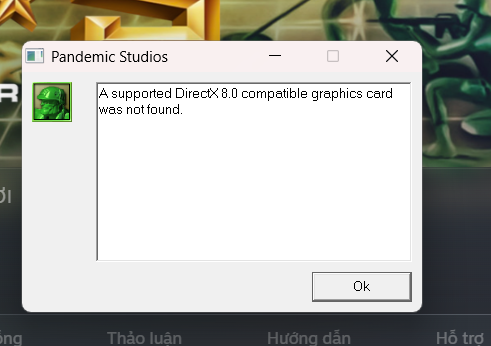
Example of DirectX 8 error in Army Men RTS

DirectX 8 compatibility issue on modern systems

Open game installation folder via Steam

Rename the file to fix the error
How to Fix “A Supported DirectX 8.0 Compatible Graphics Card Was Not Found” in Army Men: RTS
If you’re trying to run Army Men: RTS and encounter the error:
“A supported DirectX 8.0 compatible graphics card was not found” or atiumdag.dll error
Don’t worry — this is a common issue when running old games on modern PCs. In this guide, you’ll learn the fastest and most effective fix.
Why This Error Happens
- The game uses DirectX 8.0 (outdated)
- Modern GPUs don’t fully support it
- Conflict with
dbghelp.dll
Quick Fix (Recommended)
Step 1: Open Game Folder
- Open Steam Library
- Right-click Army Men RTS
- Select Properties
- Go to Local Files
- Click Browse Local Files
\library\dbg\Step 3: Rename File
Find this file:
dbghelp.dllRename it to:
dbghelp_old.dllDone! Launch the game again.
Additional Fixes
1. Install DirectX 8.0a
Older games require legacy DirectX versions. Install DirectX 8.0a to ensure compatibility.
2. Reinstall GPU Drivers (Clean)
Use tools like DDU to remove old drivers completely, then reinstall the latest version.
3. Run in Compatibility Mode
- Right-click
amrts.exe - Select Properties → Compatibility
- Choose Windows XP or Windows 7
Advanced Fix (Recommended)
Use dgVoodoo2 to emulate DirectX and improve compatibility and graphics.
- Download dgVoodoo2
- Copy
dgVoodooCpl.exeand files fromMS\x86into game folder - Run dgVoodooCpl
- Set resolution in DirectX tab
- Apply and launch game
Community Tip
Try renaming:
Olddbghelp.dllIf the default rename doesn’t work.
Conclusion
- Rename
dbghelp.dll→dbghelp_old.dll - Install DirectX 8 if needed
- Use dgVoodoo2 for best results
FAQ
Why does this happen? Old DirectX is not supported on modern systems.
Is this fix safe? Yes, widely used and safe.
Do I need dgVoodoo2? No, but it improves performance.

Ngon
ok